MatPL Commands
You can invoke MatPL with matpl, MatPL, MATPL, or PWMLFF. PWMLFF was the command used before MatPL-2025.3 and remains compatible with version 2026.3.
MatPL provides the train command for training, the test command for inference and evaluation, and several model-specific utility commands. Run matpl -h to list all supported commands.
MatPL -h
or MatPL --help
train
The train command trains a MatPL model and requires a prepared JSON training configuration.
MatPL train input.json
- For NEP training, see NEP training.
- For DP training, see DP training.
- For NN training, see NN training.
- For LINEAR training, see LINEAR training.
train output directory
After force-field training, the following files and directories are generated:
├── model_record
│   ├── epoch_train.dat
│   ├── epoch_valid.dat
│   ├── nep_model.ckpt
│   └── nep5.txt
├── std_input.json
├── train.json
└── forcefield/
    └── forcefield.ff
-
std_input.jsoncontains all settings used for training, including user-defined and default parameters. -
model_record/nep_model.ckptis the force-field checkpoint saved after the latest epoch..ckptis a PyTorch-readable format. The corresponding files aredp_model.ckptfor DP andnn_model.ckptfor NN. -
model_record/nep5.txtis the text-format force field extracted fromnep_model.ckptfor MD in LAMMPS or GPUMD. Other model types do not generate this file. -
model_record/epoch_train.datsummarizes the loss ontrain_datafor each epoch, as shown below. From left to right, the columns are: epoch; total loss; L2 loss, omitted when L2 regularization is disabled (lambda_2for ADAM andpo_weightfor LKF); atomic-energy RMSE (eV/atom); force RMSE (eV/Å); atomic-virial RMSE (eV/atom), omitted whentrain_virialis disabled; learning rate; and epoch time in seconds.
# epoch              loss           Loss_l2   RMSE_Etot(eV/atom)         RMSE_F(eV/Å)   RMSE_virial(eV/atom)           real_lr        time(s)
    1    4.7907987747e+04  1.3987758802e-01     2.2508174106e+00     7.7088011034e-01       5.4796850561e+00  1.0000000000e-03         3.5540
    ......
model_record/epoch_valid.datsummarizes the validation loss onvalid_dataafter each epoch. It is not generated when no validation set is configured. From left to right, the columns are: epoch; total loss; atomic-energy RMSE (eV/atom); force RMSE (eV/Å); atomic-virial RMSE (eV/atom), omitted whentrain_virialis disabled; learning rate; and epoch time in seconds.
# epoch              loss   RMSE_Etot(eV/atom)         RMSE_F(eV/Å)   RMSE_virial(eV/atom)
    1    2.9945036197e+04     1.8128180972e+00     6.5953191220e-01       5.2145886493e+00
- The
forcefielddirectory contains text-format NN or Linear force fields for the Fortran LAMMPS interface.
test
The test command evaluates a MatPL model and requires a prepared JSON inference configuration. When successful, it outputs predicted energies and forces for the test data.
MatPL test input.json
- For NEP testing, see NEP testing.
- For DP testing, see DP testing.
- For NN testing, see NN testing.
- For LINEAR testing, see LINEAR testing.
test output directory
After testing, a test_result directory is created in the current directory to store the evaluated structures and results:
test_result/
│   ├──image_atom_nums.txt
│   ├── dft_total_energy.txt
│   ├── dft_force.txt
│   ├── dft_virial.txt
│   ├── dft_atomic_energy.txt
│   ├── inference_total_energy.txt
│   ├── inference_force.txt
│   ├── inference_virial.txt
│   ├── inference_atomic_energy.txt
│   ├── inference_summary.txt
│   ├── Energy.png
│   └── Force.png
└── std_input.json
-
image_atom_nums.txtstores the atom count of each structure in the test set. -
dft_total_energy.txtstores the energy label for each structure. -
dft_force.txtstores per-atom force labels. Each line contains the x, y, and z force components of one atom. -
dft_virial.txtstores one virial label per structure. If virial information is unavailable, the line contains nine-e6placeholders. -
dft_atomic_energy.txtstores per-atom energy labels, a PWmat-specific label, with one structure per line. -
inference_total_energy.txtstores predicted energies in the same structure order asdft_total_energy.txt. -
inference_virial.txtstores one predicted virial per structure, aligned withdft_virial.txt. -
inference_atomic_energy.txtstores predicted per-atom energies, one structure per line, aligned withdft_atomic_energy.txt. -
Energy.pngcompares labeled and predicted energies. -
Force.pngcompares labeled and predicted forces. -
Virial.pngcompares labeled and predicted virials. It is omitted when the labels contain no virial data. -
inference_summary.txtcontains the evaluation summary, as shown below.
For 1140 images:
Average RMSE of Etot per atom: 0.029401988821789057
Average RMSE of Force: 0.045971754863441294
Average RMSE of Virial per atom: None

More details can be found under the file directory:
/the/path/test/test_result
ASE Interface
NEP and DP models support ASE operations on CPUs or GPUs:
Other Utility Commands
MatPL provides different utility commands for each model type.
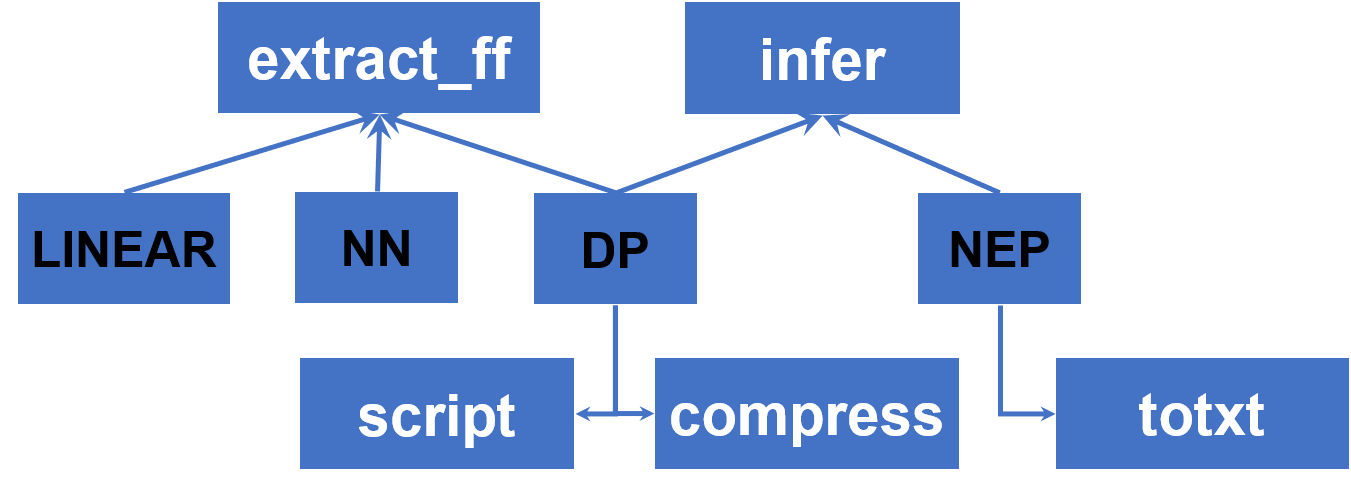
extract_ff
This command extracts an NN force-field checkpoint to text format for use with the Fortran LAMMPS interface.
# Extract the NN force-field model
MatPL extract_ff nn_model.ckpt
For usage, see:
infer
This command uses an NEP or DP model to predict the energy and forces of a single structure.
# NEP inference on a PWmat atom.config structure
MatPL infer nep_to_lmps.txt atom.config pwmat/config
MatPL infer nep_modek.ckpt atom.config pwmat/config
# DP inference on a LAMMPS dump structure
MatPL infer dp_model.ckpt 0.lammpstrj lammps/dump Hf O
For usage, see:
totxt
This NEP-specific command converts an NEP checkpoint to a text-format force field for LAMMPS or GPUMD.
MatPL totxt nep_model.ckpt
For usage, see:
compress
This DP-specific command accelerates inference by fitting the DP embedding network with polynomials. It provides a significant speedup when the training set contains many atom types. The complete command is:
MatPL compress dp_model.ckpt -d 0.01 -o 3 -s cmp_dp_model
compressis the compression command.dp_model.ckptis the required model file to compress.-dsets the grid spacing; the default is0.01.-osets the compression order:3for third order or5for fifth order. The default is3.-ssets the compressed model name. The default iscmp_dp_model.
After compression, cmp_dp_model.ckpt is created in the current directory.
For usage, see:
script
This DP-specific command converts a DP checkpoint to LibTorch format for use in LAMMPS simulations.
MatPL script dp_model.ckpt
# Creates jit_dp.pt in the current directory
# Convert a compressed force-field file
MatPL script cmp_dp_model.ckpt
# Creates jit_cmp_dp.pt in the current directory
For usage, see:
Using Force Fields in LAMMPS
MatPL provides LAMMPS force-field interfaces. For installation, see Online Installation or the offline installation guide.
Run LAMMPS as follows:
# Load the LAMMPS env.sh file from the LAMMPS source root
source /the/path/of/lammps/env.sh

# Run LAMMPS
# NEP supports Kokkos acceleration with pair style matpl/nep/kk
# Multiple GPUs on one node (four GPUs here)
mpirun -np 4 --bind-to numa lmp -k on g 4 -sf kk -pk kokkos -in kkin.lmp

# Multiple nodes and GPUs (two nodes with four GPUs each)
mpirun -np 8 --map-by ppr:4:node lmp -k on g 4 -sf kk -pk kokkos -in kkin.lmp

# Use the following form for the CPU version of matpl/nep or for matpl/dp
mpirun -np N lmp -in in.lammps
Specify the force-field path in the LAMMPS input file as shown below.
For the Kokkos-accelerated LAMMPS NEP interface:
# LAMMPS 2024 requires neigh half; LAMMPS 2023 accepts either half or full
package kokkos neigh half comm device
newton on

pair_style   matpl/nep/kk   /path/to/force-field
pair_coeff   * *     O Hf
Here:
-
LAMMPS 2024 requires
neigh half; LAMMPS 2023 accepts eitherhalforfull. -
pair_stylesets the force-field path.matpl/nep/kkselects MatPL's Kokkos GPU acceleration for NEP, whilematpl/nepuses only the CPU. For a DP model, usematpl/dp; it automatically uses a GPU when available and otherwise runs on the CPU.The interface also supports model-deviation output from multiple models, commonly used in active learning. The first model drives the MD simulation, while the others participate in the deviation calculation. Configure
pair_styleas follows:# LAMMPS 2024 requires neigh half; LAMMPS 2023 accepts either half or full
package kokkos neigh half comm device
newton on
pair_style matpl/nep/kk 0_nep.txt 1_nep.txt 2_nep.txt 3_nep.txt out_freq DUMP_FREQ_VALUE out_file model_devi.out -
LAMMPS 2024 requires
neigh half; LAMMPS 2023 accepts eitherhalforfull. -
pair_coeffmaps atom types in the simulated structure to elements. For example, if type1isOand type2isHf, usepair_coeff * * 8 72. Atomic numbers or element symbols are both accepted, provided their order matches the input structure.
For LAMMPS configuration examples for DP and NEP force fields, see:
The LAMMPS pair_style configuration is slightly different for NN and LINEAR force fields:
pair_style   matpl
pair_coeff   * * 3 1 forcefield.ff 29
-
pair_styleselects the MatPL force field. -
pair_coeffspecifies the force-field file and atom type. Here,3selects a Neural Network force field; use1for a Linear force field. The second1means that one force-field file is read,forcefield.ffis generated by MatPL, and29is the atomic number of Cu.
The MatPL-2026.3 LAMMPS interface is built with CMake and produces an executable named lmp by default. The MatPL-2025.3 interface is built with Make and produces lmp_mpi by default.